
FDI vs Universal Tooth Numbering Explained
Ask a dentist in Chicago to chart the upper right first molar and they will write 3. Ask a dentist in Manchester and they will write 16. Same tooth, same mouth, two completely different numbers.
That is not a mistake by either of them. They are using different numbering systems, and both are correct. Here is how each one works, why the split exists, and what it means when you are choosing practice management software.
The Universal Numbering System (1-32)
The Universal Numbering System is the standard in the United States, and it is the simplest of the two to describe: teeth are numbered 1 through 32 in one continuous sweep.
Start at the upper right third molar (the wisdom tooth) and count across the top of the mouth to the upper left third molar. That gets you from 1 to 16. Drop down to the lower left third molar, which is 17, and sweep back across to the lower right third molar, which is 32.
One number per tooth, no quadrants, no punctuation. Its strength is that it is easy to say out loud and hard to mishear — "number 14" is unambiguous.
Its weakness is that the number tells you nothing on its own. There is no way to work out where tooth 21 sits without either memorising the sequence or counting. It also does not extend gracefully to primary (baby) teeth, which is why the same system switches to letters A through T for children.
FDI Two-Digit Notation (11-48)
FDI notation, also called ISO 3950, is used through most of the rest of the world. Instead of one continuous count, each tooth gets two digits that encode its position.
The first digit is the quadrant, viewed from the front:
- 1 — upper right
- 2 — upper left
- 3 — lower left
- 4 — lower right
The second digit is the position within that quadrant, counting outward from the midline: 1 is the central incisor, 8 is the third molar.
So tooth 11 is upper right, first from the midline — the upper right central incisor. Tooth 36 is lower left, sixth from the midline — the lower left first molar.
Once the pattern clicks, the number is self-describing. You never have to memorise a sequence, because the number tells you exactly where the tooth is. Primary teeth reuse the same logic with quadrants 5 through 8, so the system stays internally consistent rather than switching to a separate alphabet.
The trade-off is spoken clarity. FDI numbers are read digit by digit — "one, one," not "eleven" — precisely because "eleven" and "seven" can be confused across a noisy operatory.
Why the Split Exists
The Universal system was proposed in the US in the 1880s and became entrenched through American dental education and insurance coding. FDI notation came much later, adopted by the Fédération Dentaire Internationale in 1971 and subsequently as an ISO standard.
By then the US had a century of records, textbooks, and claim forms built around Universal numbering. The cost of switching was enormous and the benefit was mostly theoretical, so the US stayed put while most of the world standardised on FDI. Neither system is winning; they simply serve different populations.
There is also a third system, Palmer notation, which uses a symbol to indicate the quadrant alongside a number. It remains in some use, particularly among orthodontists and in the UK, but it is awkward to type and represent in software, and it has largely given way to FDI in digital records.
The Same Chart, Both Ways
Here is one patient's chart in DentoD, shown in each system. Nothing about the record changed between these two images — only the numbering the software displays.
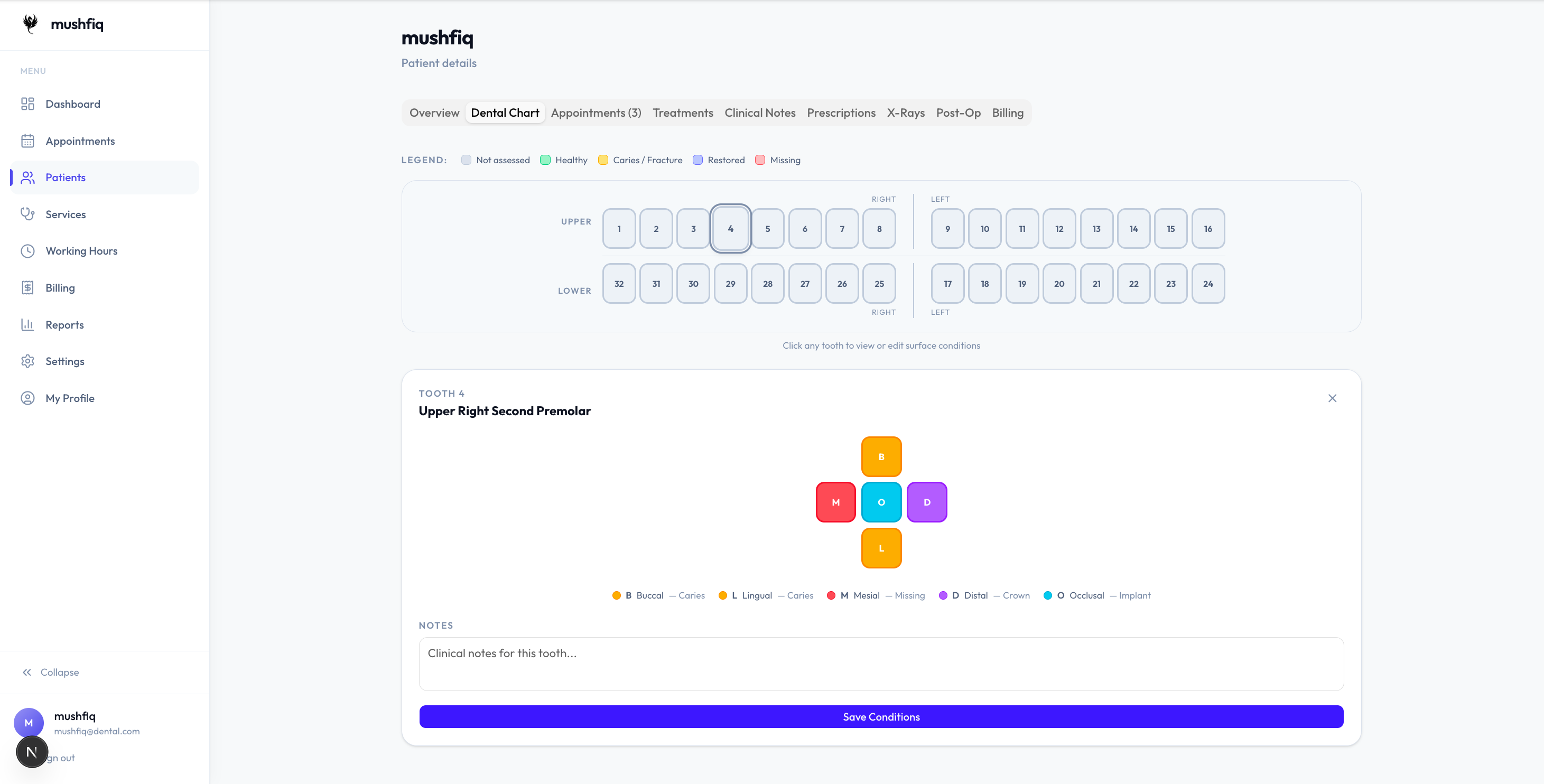
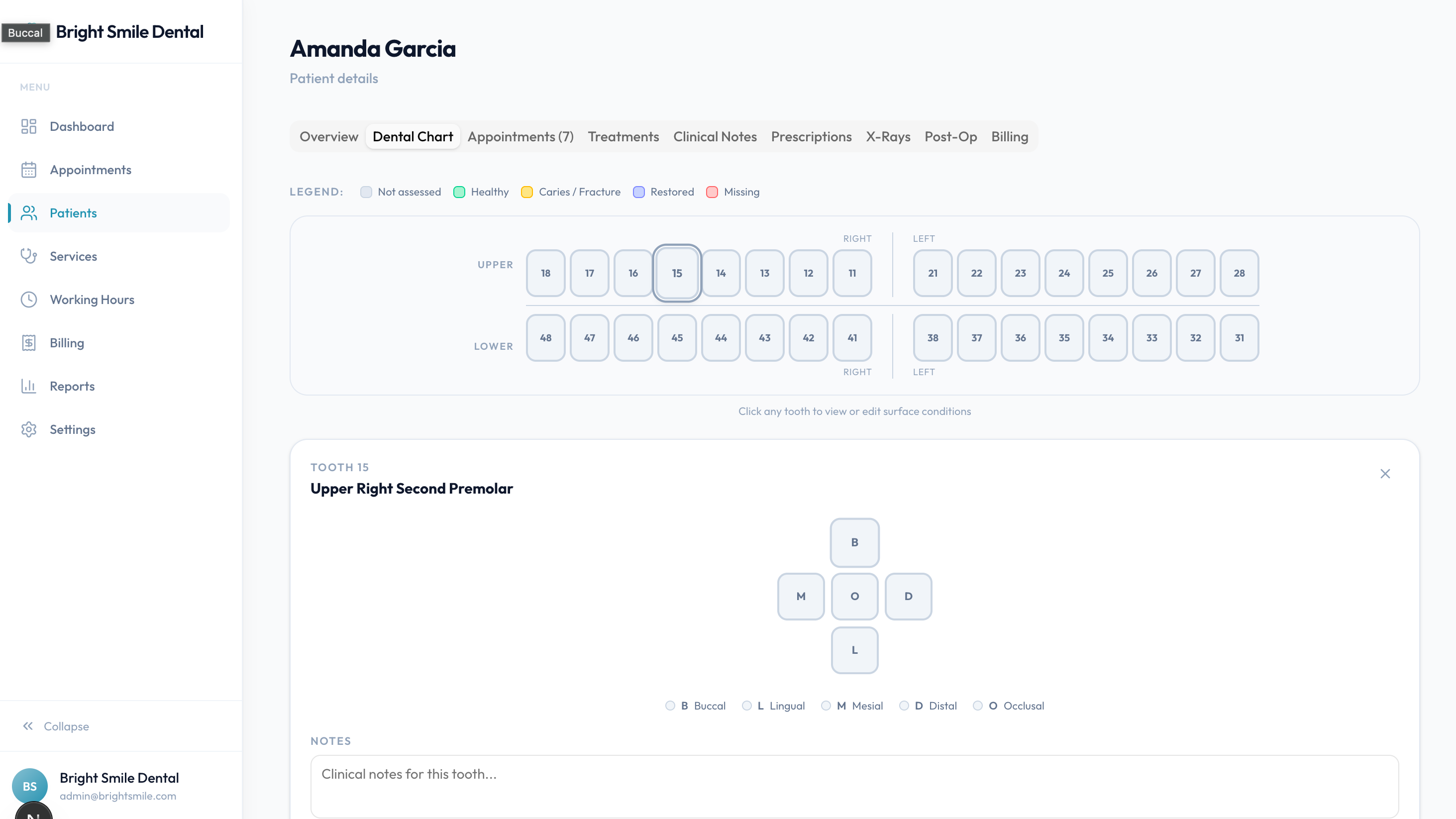
Look at the upper right in each. Universal counts 1, 2, 3, 4 inward from the third molar. FDI counts 18, 17, 16, 15 — quadrant 1, positions 8 down to 5. Same teeth, same order, different labels.
Full Conversion Chart
Every permanent tooth in both systems:
| Quadrant | Tooth | FDI | Universal |
|---|---|---|---|
| Upper right | Third Molar | 18 | 1 |
| Upper right | Second Molar | 17 | 2 |
| Upper right | First Molar | 16 | 3 |
| Upper right | Second Premolar | 15 | 4 |
| Upper right | First Premolar | 14 | 5 |
| Upper right | Canine | 13 | 6 |
| Upper right | Lateral Incisor | 12 | 7 |
| Upper right | Central Incisor | 11 | 8 |
| Upper left | Central Incisor | 21 | 9 |
| Upper left | Lateral Incisor | 22 | 10 |
| Upper left | Canine | 23 | 11 |
| Upper left | First Premolar | 24 | 12 |
| Upper left | Second Premolar | 25 | 13 |
| Upper left | First Molar | 26 | 14 |
| Upper left | Second Molar | 27 | 15 |
| Upper left | Third Molar | 28 | 16 |
| Lower left | Third Molar | 38 | 17 |
| Lower left | Second Molar | 37 | 18 |
| Lower left | First Molar | 36 | 19 |
| Lower left | Second Premolar | 35 | 20 |
| Lower left | First Premolar | 34 | 21 |
| Lower left | Canine | 33 | 22 |
| Lower left | Lateral Incisor | 32 | 23 |
| Lower left | Central Incisor | 31 | 24 |
| Lower right | Central Incisor | 41 | 25 |
| Lower right | Lateral Incisor | 42 | 26 |
| Lower right | Canine | 43 | 27 |
| Lower right | First Premolar | 44 | 28 |
| Lower right | Second Premolar | 45 | 29 |
| Lower right | First Molar | 46 | 30 |
| Lower right | Second Molar | 47 | 31 |
| Lower right | Third Molar | 48 | 32 |
Two quick sanity checks when you are converting by hand: the upper right first molar is FDI 16 and Universal 3, and the lower right third molar is FDI 48 and Universal 32.
Watch the direction of travel in the lower arch. Universal numbering runs right to left across the top, then left to right across the bottom, because it is sweeping around the mouth in a single loop. FDI always counts outward from the midline within each quadrant. This is where most manual conversion errors come from.
If you would rather not convert by hand, the tooth numbering chart has an interactive Universal-to-FDI converter and a page for every tooth with its Palmer notation, surfaces, and common procedures.
Which Should Your Practice Use?
In practice this is rarely a real decision — it is a matter of where you trained and where you practise.
Use Universal if you are in the United States. Your team learned it, your insurance claims expect it, and your referral network speaks it.
Use FDI if you are almost anywhere else, or if you work with internationally trained clinicians who would have to convert in their heads all day otherwise.
The more interesting question is what happens when a practice has both. A US clinic that hires an associate trained in Europe now has one clinician mentally translating every tooth number, on every patient, all day. That is a genuine clinical safety issue, not just an inconvenience: charting the wrong tooth is one of the more consequential errors in dentistry, and mental arithmetic under time pressure is exactly how it happens.
The answer is not to make people convert. It is to pick one system for the practice and let the software display it consistently everywhere.
How DentoD Handles It
DentoD supports both systems. A clinic admin chooses Universal or FDI in Settings, and the entire tooth chart is labelled in that system from then on.
The important detail is what happens underneath. Numbering in DentoD is a display setting, not a storage format. Records are stored the same way regardless of which system you have selected, so switching between them relabels the chart without converting, migrating, or rewriting a single record. Nothing is lost, and you can switch back at any time.
Two things worth knowing before you set it:
- It is a practice-level setting, not a per-user preference. Everyone in the clinic sees the same numbering, which is the point — a shared chart that different people read differently would defeat the purpose.
- The setting appears once dental charting is enabled for your practice.
If you are evaluating charting software, notation support is worth checking early. It is easy to assume any dental platform handles both, and not every one does.
Want to see it in practice? Read more about dental charting in DentoD, or see the practical guide to charting software for what else to look for.